NOAA Marine Weather
- 3.6
- Rating
- 100.00K
- Installs
- Free
- Price
 Analysis by App-foxy
Weather apps are easy to judge on a sunny afternoon and much harder to judge when the forecast actually matters. I spent time with NOAA Marine Weather as a focused weather app from DOSA Apps, and my impression is that it is aimed at people who want marine conditions close at hand rather than a broad lifestyle dashboard filled with unrelated extras. That narrow purpose is both its appeal and its biggest limitation.
The app is free to install and carries an Everyone content rating, so it is approachable for casual users as well as people who regularly check coastal conditions. It has reached over one hundred thousand installs and holds a 4.0 average from around one thousand four hundred ratings, which suggests a useful but not universally perfect experience. I would describe it as a practical specialist tool: worth trying if marine weather is part of your routine, but not automatically the best replacement for every general forecast app on your phone.
How NOAA Marine Weather feels in everyday use
My first expectation was that a marine-focused app should get to the important information quickly. That matters more here than decorative maps, animated backgrounds, or a long news-style forecast. When I am checking conditions before leaving home, I want a short path from opening the app to understanding whether the weather looks manageable. NOAA Marine Weather generally makes sense in that role because its identity is clear from the start: this is for checking marine weather, not for turning weather into a visual entertainment experience.
You May Also Like

 Blood Strike: 2.5 Anniversary
Blood Strike’s Loadouts Turn Every Drop Into a Tactical Gamble
A close look at Blood Strike’s custom loadouts: how fast access to signature weapons reshapes its battle royale rhythm, rewards preparation, and narrows the gap between fights.

 Pandora - Music & Podcasts
Pandora’s Music Is Easy to Start, but Harder to Recover
Pandora’s strength is its low-effort path from a seed to a station. Its weak spot is how much confidence it asks you to place in connection, setup, and quiet recovery.

 8 Ball Pool
 Is Built on Rivalries, Rematches, and Routine
A close look at the rivalries, rematches, shared routines, and unanswered safety questions that turn a quick pool match into a persistent mobile community.

 Samsung Music
’s Quiet Strength Is Playing What You Already Own
Its reach comes less from spectacle than from dependable access to a personal library. That simplicity is both the app’s strongest retention engine and its ceiling.

 AccuWeather: Weather Radar
AccuWeather Review: A Quick, Clear Forecast for Everyday Decisions
For everyday plans, the best forecast is the one you can understand quickly. AccuWeather makes rain timing, radar, and local conditions easy to act on, with a few trade-offs.

 Hill Climb Racing
Why Hill Climb Racing Still Turns Crashes Into One More Run
A tiny car, a bumpy hill and one more upgrade: Hill Climb Racing keeps resurfacing because its simple chaos makes every near-miss feel personal.
More From Our News Desk



The perceived speed is best understood as a matter of focus. A compact weather tool can feel faster than a feature-heavy alternative simply because there are fewer decisions to make. I found that useful when I wanted a quick look before a walk near the water, a fishing plan, or a trip where wind and changing conditions mattered more than an elaborate hourly presentation. The app does not need to compete with a full weather platform on every screen; it needs to make the relevant information easy to reach.
That focus also means you should not expect the same kind of polished, all-purpose experience offered by large mainstream weather services. If your daily routine involves pollen, radar layers, severe-weather alerts, commute planning, widgets, and detailed city forecasts, a broader app may feel more complete. NOAA Marine Weather is more convincing when I treat it as a dedicated marine check rather than my only source for every weather question.
What I would check before relying on it
I would begin by selecting or reviewing the location that matters to my outing, then compare the displayed marine conditions with the wider forecast I normally use. This is not because the app is unsuitable, but because marine decisions often depend on context. A calm-looking local reading does not tell the whole story of a longer route, an exposed shoreline, or conditions that may change while I am away from a reliable connection.
One practical habit is to check twice: once while planning and again shortly before leaving. The first check helps with timing and preparation; the second catches changes that could alter the plan. This workflow is more valuable than simply opening any weather app once and assuming that one glance settles the question. I would also keep an alternative source available for urgent warnings, especially when the activity involves open water or limited shelter.
The app's free price makes that comparison easy. I can install it without committing money, see whether its marine presentation fits my routine, and keep another weather service for broader information. There are in-app purchases ranging from under one dollar to just under one hundred dollars per item, so I would pay attention to any optional purchase screen and decide whether an added function genuinely improves my use. The free entry point is attractive, but the presence of purchases means I would not assume every useful capability belongs to the basic experience.
Heavy-use moments reveal the real trade-offs
Weather apps are often used in bursts rather than continuously. I might open one several times before a boat trip, refresh it while preparing equipment, and check again after a sudden change in the sky. In those moments, the most important performance question is not whether the app looks impressive for a long session. It is whether it remains understandable and usable during repeated short checks.
NOAA Marine Weather makes the most sense for that burst pattern. A marine user may want a quick confirmation of conditions, close the app, and return later. That is different from leaving a weather map open all day or using the phone as a permanent monitoring station. I would avoid treating it as a substitute for active observation. Wind, visibility, waves, and local conditions deserve attention beyond whatever is shown on a screen.
A realistic example is a weekend shoreline trip. Before leaving, I would use the app to form an initial picture of marine conditions, then check a general forecast for the drive and local land weather. If the plan involves a small craft, I would make a second check before launching and avoid making the app the only basis for a go-or-no-go decision. Its value in that situation is as a convenient reference point, not as permission to ignore official warnings, equipment, experience, or changing conditions.
Another useful scenario is planning around a narrow window. Suppose I have only a short period available for fishing or taking photographs near the coast. I can use the app to decide when to look more closely at marine conditions, but I would still leave room for uncertainty. A forecast can support a plan without guaranteeing that the plan will remain comfortable or safe. That distinction is especially important for newcomers who may read a clean interface as more certain than the underlying weather really is.
Stability, recovery, and the limits of confidence
My overall impression is that the app is best judged as a straightforward utility rather than a demanding, constantly running service. A focused weather app should not need the same resources as a navigation game or a video editor, and I would expect short checking sessions to be relatively light on the phone. Still, perceived stability depends on more than the app itself. Weather information may require a working connection, and a phone that is low on battery, busy with other tasks, or in a poor-signal area can make any forecast tool feel unreliable.
That is why I would build a recovery habit into my use. If a screen takes longer than expected, I would first check the connection, retry once, and avoid repeatedly refreshing in a weak-signal location. Before heading somewhere remote, I would review the conditions while connected and keep the important details in mind rather than assuming I can always retrieve them later. This is a sensible precaution for a marine app and not a criticism unique to this product.
I also would not confuse app stability with forecast certainty. A screen can load correctly while conditions change afterward. Conversely, a delayed display can be caused by connectivity rather than a failure in the app. Keeping those two issues separate helps set fair expectations. NOAA Marine Weather can be a useful part of preparation, but it should not replace judgment, local knowledge, or official emergency information when the situation is serious.
Recovery after interruption is another practical consideration. If I switch away from the app while gathering gear or answering a call, I want to return and continue checking rather than start my whole planning process from scratch. For a short utility session, that kind of simple recovery matters more to me than elaborate customization. I would test this on my own phone before a trip, particularly if the app is new to me or the outing has limited connectivity.
Device constraints and who should skip it
The listed minimum operating-system requirement is Android 8.0, which gives the app a reasonably accessible starting point for Android users with older devices. That does not guarantee identical behavior across every phone. Screen size, manufacturer software, available storage, background restrictions, and connection quality can all affect how comfortable a weather app feels. On a small or aging device, I would value clear information more than visual extras and would avoid keeping unnecessary apps active during a long day outdoors.
Resource demands are likely to matter most when the phone is already under pressure. If I am using navigation, taking photographs, listening to audio, and checking weather repeatedly, battery use comes from the whole outing rather than one app alone. I would bring a power bank for a long marine day and avoid assuming that a weather tool can function as an always-on safety monitor. That is good device practice regardless of the model, but it is particularly relevant when the phone may be needed for communication or navigation later.
People using iPhones should also check the appropriate platform availability before planning around the app. I would not build a trip workflow on an app until it is installed and tested on the device I will actually carry. The same advice applies to Android users updating from an older phone: install the current version, confirm the interface is comfortable, and try the main checks before leaving home. The current version is 11.1.0.1.1, so keeping the installation current is a sensible part of that preparation.
Who should skip it? I would look elsewhere if I wanted a single polished dashboard for inland forecasts, radar, severe alerts, health-related weather details, and daily planning. I would also skip it as my primary tool if I need advanced navigation or a comprehensive boating information system. A specialist marine weather app can complement those tools, but it does not automatically replace them.
Where it fits beside usual weather alternatives
The usual alternative is a general weather app that covers a city or current location with hourly forecasts, radar, alerts, and a broad collection of extras. Those apps are convenient when my questions are mostly about commuting, errands, temperature, or rain later in the day. They may also be better for people who want a polished home-screen glance and do not spend much time near the water.
NOAA Marine Weather has a different reason to exist. Its marine emphasis makes it more relevant when the key question concerns conditions around a coastal or boating activity rather than simply whether I should carry an umbrella. That specialization can reduce clutter for the right user. The trade-off is that I may need another app for the rest of the journey, including road weather, inland destinations, or a richer visual forecast.
I see it as a companion rather than an automatic winner. I might use a general weather app for the drive, NOAA Marine Weather for the marine check, and official local guidance when conditions are potentially hazardous. That three-part approach is less convenient than relying on one app, but it is more honest about the different questions involved. The best choice depends on whether marine information is central to my day or only an occasional curiosity.
Small habits that make the app more useful
My first tip is to separate planning from decision-making. Use the app early to compare possible times and identify whether conditions deserve closer attention. Then make the final decision nearer to departure, with current warnings and real-world observations included. This prevents a forecast checked hours earlier from becoming an accidental promise.
My second tip is to test the app in the exact settings where you expect to use it. Check it indoors, outdoors, on Wi-Fi, and on mobile data if possible. That simple rehearsal tells me whether the text is readable in bright light, whether the phone handles the session comfortably, and what I should do if the connection is weak. It also exposes friction before it matters.
My third tip is to avoid letting optional purchases define the decision too early. Since the app includes in-app items from around one dollar up to nearly one hundred dollars, I would first establish whether the basic workflow solves my actual problem. A purchase may be worthwhile for a frequent user, but an occasional beach visitor may gain more by keeping the free version alongside a familiar general forecast app.
Finally, I would use the app as a prompt to ask better questions: Is the route exposed? How quickly could I return? What happens if the forecast changes? Do I have enough battery and communication options? Those questions add more safety and usefulness than any single reading. The app is at its best when it supports preparation rather than encouraging overconfidence.
My performance verdict
After weighing speed expectations, repeated checks, recovery, and device constraints, I see NOAA Marine Weather as a focused and approachable option for Android users who genuinely need marine weather information. DOSA Apps has positioned it around a clear use case, and the free installation lowers the risk of trying it. Its 4.0 average and established install base suggest that many people find value in it, while also leaving room for the uneven experiences that are common with specialized utility apps.
The strongest reason to install it is not that it replaces every weather tool, but that it gives marine conditions a dedicated place in your planning routine. I would recommend it to boaters, anglers, coastal visitors, and anyone who regularly needs a marine-oriented check before heading out. I would be more cautious about recommending it to someone who wants one complete weather dashboard or expects a weather app to serve as a safety system by itself.
For me, the sensible verdict is to try the free version, test it before an important outing, and pair it with broader forecasts and official warnings when the stakes are high. If that focused workflow matches your needs, the app can be a useful, low-commitment addition. If your weather questions are mostly about city temperatures, commuting, or radar, a conventional general-purpose alternative will probably feel more natural.
In short, NOAA Marine Weather earns consideration because it stays close to a specific problem instead of pretending every user needs the same forecast experience. I would keep it as a practical reference for marine planning, while remembering its proper place: one helpful layer in a careful decision, not the entire decision itself.
FAQs for NOAA Marine Weather
01What features does the NOAA Marine Weather app offer?
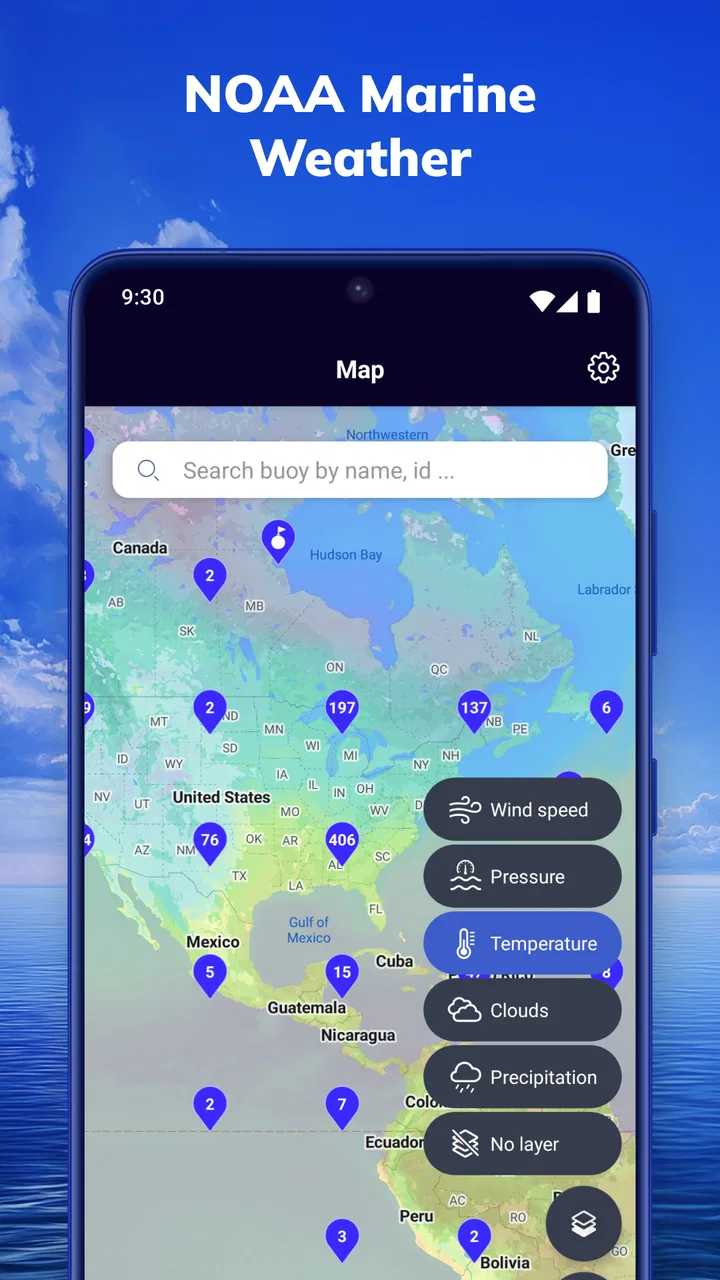
The NOAA Marine Weather app provides real-time weather updates, marine forecasts, tide predictions, and radar imagery. Users can access detailed weather maps, set customizable alerts for severe weather, and receive notifications about changing conditions. The app is designed to be intuitive, catering to both casual users and seasoned mariners.
02Is the NOAA Marine Weather app available for both Android and iOS?
Yes, the NOAA Marine Weather app is available for download on both Android and iOS platforms. Users can find the app in the Google Play Store for Android devices and the Apple App Store for iOS devices, ensuring broad accessibility for smartphone and tablet users alike.
03Does the app require a subscription or any in-app purchases?
The NOAA Marine Weather app offers a free version with basic features. However, for advanced features such as ad-free access, extended forecasts, and personalized alerts, users may need to subscribe to a premium version or make in-app purchases. This ensures users can choose the level of service that best fits their needs.
04How accurate is the weather information provided by the app?
The NOAA Marine Weather app sources its data directly from the National Oceanic and Atmospheric Administration (NOAA), ensuring high accuracy and reliability. The app's forecasts are updated regularly, utilizing the latest meteorological data to provide users with precise and current weather information.
05Can the app be used offline?
While the NOAA Marine Weather app requires an internet connection for real-time updates, users can download certain data, such as maps and forecasts, for offline access. This feature is particularly useful for mariners who may experience limited connectivity while at sea, allowing them to stay informed even without an active internet connection.
Pros
- Comprehensive weather data coverage.
- User-friendly interface for easy navigation.
- Real-time alerts for severe conditions.
- Customizable map layers.
- Offline access to saved data.
Cons
- Requires large data for updates.
- Limited customization for alerts.
- Ads can be intrusive at times.
- Subscription needed for premium features.
- Occasional app crashes reported.

NOAA Marine Weather
Gallery